

Comprar una nueva impresora digital es una de las más importantes inversiones que un propietario de un taller gráfico puede hacer, y puede ser algo vital para el crecimiento de su negocio. Ya sea que usted esté modernizando su empresa hacia un sistema de formato ancho más rápido, agregando habilidades UV, produciendo decoraciones de vestimentas o adquiriendo su primer dispositivo de impresión profesional, una maquinaria correcta abre las puertas de nuevos flujos de ingresos, entregas más rápidas de pedidos y mejores márgenes de ganancias. Sin embargo, los precios de los dispositivos de impresión de alta gama hacen que muchos propietarios de talleres se lo piensen dos veces.
En esta entrada de blog responderemos algunas preguntas frecuentes sobre cómo pagar por equipos de impresión, cómo los alquileres pueden ser beneficiosos, y el tiempo de amortización típico de una impresora.
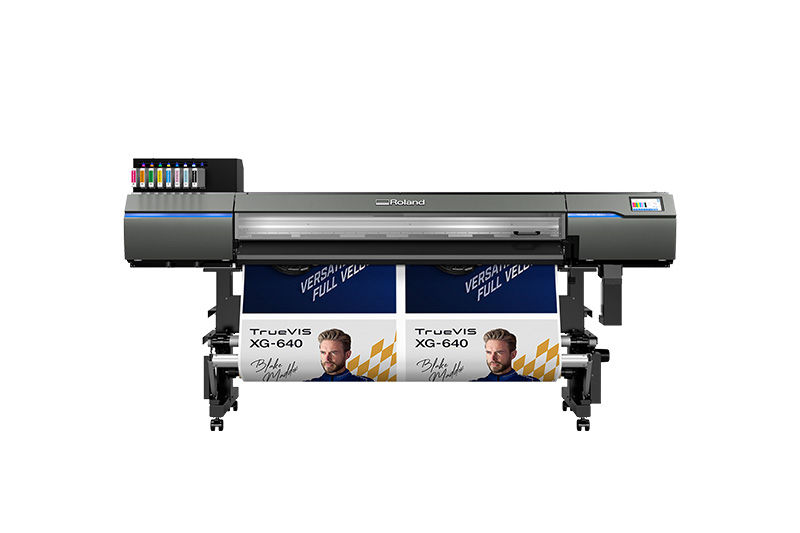
¿Cuánto cuesta una impresora digital de calidad profesional?
Dependiendo del tipo de tintas y tamaño de dispositivo que usted considere, una impresora digital de calidad profesional puede costar entre US$ 10.000 a bastante más de US$ 250.000. La mayoría de negocios no pueden asumir un gasto de capital tan elevado con fondos propios, y es aquí donde la financiación de maquinaria a menudo se vuelve no solo una opción práctica sino la estrategia comercial más inteligente disponible.

¿Cuáles son algunas de las formas típicas de pago para equipos de impresión digital?
Aunque algunos pagan por sus equipos de impresión directamente, otros canjean equipos antiguos o los venden antes de comprar una nueva impresora.
Ciertamente es posible comprar una impresora con una tarjeta de crédito o préstamo empresarial de un banco o financiera; sin embargo, las tarjetas de crédito a menudo están sobrecargadas con tasas de interés altísimas, y calificar para un préstamo bancario puede ser un proceso prolongado con bastantes trámites.
Muchos optan, en cambio, por un contrato de alquiler. De hecho, según Geneva Capital, el 80% de todos los negocios alquilan, y el 30% de todos los recursos adquiridos en los EE.UU. son alquilados.
¿Cuáles son las consideraciones para un alquiler?
Con el alquiler hay varias opciones a considerar, incluyendo una mínima o ninguna cuota inicial, alquiler con opción a compra, oportunidades de modernización y pagos mensuales flexibles. El alquiler de los equipos de impresión les da a los talleres gráficos varias ventajas importantes:
Permite el uso de efectivo para otras necesidades – El beneficio inmediato del financiamiento es directo: se retiene el capital de trabajo. Drenar sus reservas para pagar en efectivo un solo recurso deja a su empresa vulnerable. Un financiamiento le permite evitar grandes pagos por adelantado y mantener el capital de trabajo disponible para operaciones diarias, emergencias y nuevas oportunidades. Piénselo de esta forma: el efectivo en su cuenta bancaria es una herramienta, y bloquearlo con un dispositivo impide su uso para otras cosas. El financiamiento permite que la impresora se pague a sí misma mediante los ingresos que genera, en lugar de drenar capital que usted pueda necesitar a futuro.
Permite pagos predecibles – El financiamiento de equipos ofrece un pago mensual fijo que simplifica los presupuestos y proyecciones de flujo de caja. Usted sabe exactamente lo que cuesta la máquina cada mes, lo cual hace más fácil fijar los precios de sus trabajos de forma precisa y proyectar la rentabilidad.
Proporciona una ruta para la modernización a medida que la tecnología evoluciona – La ciencia de la impresión digital avanza rápidamente. Los programas de alquiler, opciones de intercambio y formas de actualización protegen contra una obsolescencia tecnológica acelerada, permitiendo a los talleres mantenerse actualizados sin absorber constantemente precios completos de compra de nuevos equipos.
Permite desarrollar un crédito empresarial – Todo acuerdo de financiamiento de equipos que usted gestione responsablemente es un evento que construye el crédito para su empresa. Un taller con un sólido historial de financiamiento y pago de préstamos está en una mejor situación para asegurar condiciones favorables en una próxima compra.
La página de servicios financieros de Roland DGA contiene más información sobre el alquiler.
¿Cuánto tiempo se necesita para recuperar la inversión de una impresora?
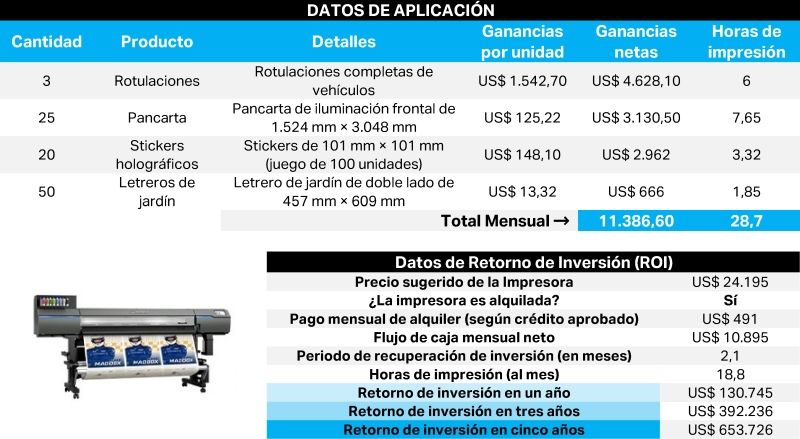
Las impresoras han sido diseñadas para generar ingresos cada vez que se usen. La respuesta sobre la recuperación de la inversión de su empresa depende del tipo específico de impresora y las aplicaciones que usted produzca.
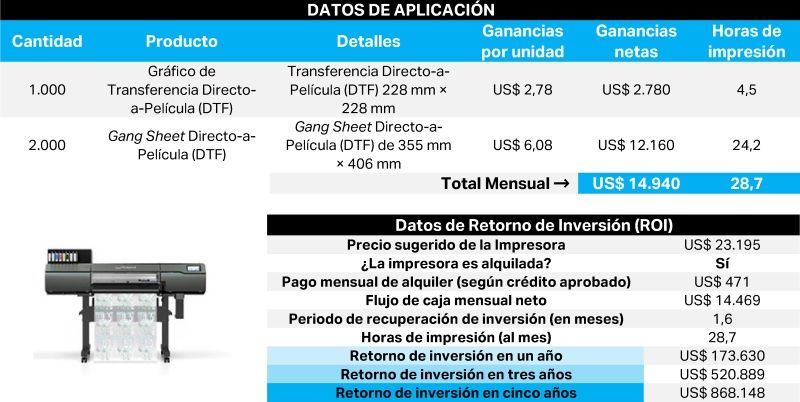
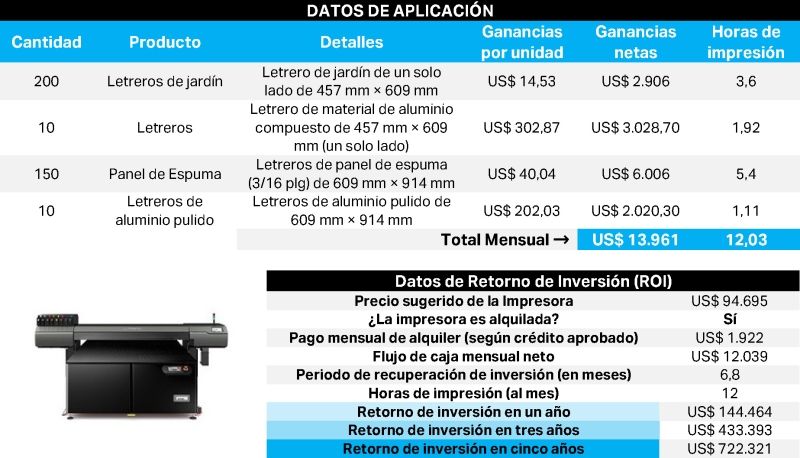
Aquí varios ejemplos que le pueden dar una idea del retorno de inversión (ROI) esperado con distintos tipos de impresoras y productos.
Impresora Eco-Solvente/ Cortadora TrueVis XG-640
Impresora Directo-a-Película (DTF) TY-300i
Impresora UV de cama plana VersaObject LO/COi
Mi situación es distinta. ¿Cómo puedo saber más acerca de mis opciones de compra?
Visite el Profit Center de Roland DGA en cualquier importante feria comercial y estaremos encantados de platicar con usted sobre sus opciones.
O simplemente comuníquese con nosotros y un experto de Roland DG le responderá.
