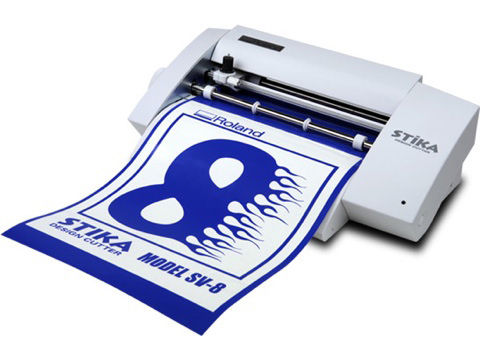
Cortadora de Vinilo Stika SV-8 de 20 cm | Roland DGA
Aviso Importante Aviso Temporal de Servicio: Controladores y Descargas — Actualmente estamos realizando tareas de mantenimiento en nuestro Centro de Controladores y Descargas para garantizar la seguridad y confiabilidad continuas de nuestros servicios en línea.

Aviso Temporal de Servicio: Controladores y Descargas

Actualmente estamos realizando tareas de mantenimiento en nuestro Centro de Controladores y Descargas para garantizar la seguridad y confiabilidad continuas de nuestros servicios en línea. Durante este periodo, es posible que algunos programas de software, controladores, manuales y otros recursos descargables no estén disponibles temporalmente.

Prevemos restablecer el acceso a más tardar el lunes 26 de octubre de 2026. Sin embargo, el periodo de mantenimiento podría extenderse si se requiere trabajo adicional.

Si necesita asistencia inmediata para obtener software, controladores o documentación, ingrese su número de serie a continuación para abrir un caso de soporte. Nuestro equipo de soporte con gusto le ayudará con opciones alternativas.

Le ofrecemos una sincera disculpa por cualquier inconveniente y agradecemos su paciencia y comprensión mientras trabajamos para restablecer estos servicios lo antes posible.

Equipo de Atención al Cliente de Roland DGA

Cortadora de Vinilo Stika SV-8 de 20 cm

Artículos relacionados
How to install a Roland driver in Windows 7 and Windows Vista


sv-8

Obtenga lo último en Software, Firmware y Manuales
Visite el Centro de Descargas Roland DG


Búsqueda sv-8 Documents & Knowledge Base Articles
Expandir Todo | Desplegar Todo
High resolution video of tracing raster artwork in CutStudio software using the Image Outline function.
59.33 KB
Windows 10
This document PDF lists instructions of how to install Roland drivers on Windows 10.
1.67 MB
OS Compatibility List
55.12 KB
Stika Driver SV Windows 10 32 bit v1.30. Zip format.
5.12 MB
Stika Driver SV Windows 10 64 bit v1.30. Zip format
5.54 MB
Windows 2000
Model : STX-7, STX-8, SX-8, SX-12, SX-15, SV-8, SV-12, SV-15 OS : Windows2000,
50.32 KB
Windows 7
Stika Driver SV Windows 7 32 bit v1.30. Zip format
5.09 MB
Stika Driver SV Windows 7 64 bit v1.30. Zip format
5.52 MB
Windows 7, Windows Vista
This document PDF outlines the procedures to install a Roland driver in Windows 7 and Windows Vista.
239.03 KB
Windows 8
Stika Driver SV Windows 8 8.1 32 bit v1.30. Zip format.
5.12 MB
Stika Driver SV Windows 8 8.1 64 bit v1.30. Zip format.
5.54 MB
Windows 95/98, Windows Me
Model : STX-7, STX-8, SX-8, SX-12, SX-15, SV-8, SV-12, SV-15 OS : Windows95, Windows98, WindowsMe Please follow the instruction described in readme.txt for installation.
59.67 KB
Windows Vista
Stika Driver SV Windows VISTA 64 bit v1.30. Zip format
5.52 MB
Stika Driver SV SX Windows VISTA 32 bit v1.30. Zip Format
5.09 MB
Windows XP
Stika Driver for Windows XP 32 Bit V1.22. Zip format.
5.25 MB
Stika Driver Windows XP 64 Bit v1.22. Zip format
5.56 MB
This is an installer for STIKA Windows Advanced Guide HTML. This .exe file can be unzipped and installed to your desktop.
3.36 MB
This is an installer for STIKA Windows Advanced Guide HTML for Macs. This .exe file can be unzipped and installed to your desktop.
190.35 KB
STIKA SV Series Users Manual PDF
1.40 MB
Manual de usuario para las cortadoras serie STIKA PDF
2.08 MB
Data sheet for Stika SV-8, SV-12, SV-15 vinyl cutters. Includes specs, applications, etc.   SV8, SV12, SV15
8.98 MB
This documents reviews the current Roland DGA depot repair policy
147.37 KB
This guide PDF offers helpful tips for achieving optimal cut quality and describes the blades that are available by Roland and lists which blade to choose based by application.
302.70 KB
Este documento explica los principios básicos de la cuchilla de corte, y ofrece sugerencias para solucionar problemas con el corte.
283.22 KB
Most Roland devices are supplied with a one year standard manufacturers warranty, but by registering your device within 60 days of purchase, your product could qualify for an extended warranty of up to 3 years.
78.33 KB
This guide PDF includes port testing instructions for the Roland Stika vinyl cutters.
82.99 KB
This is an updating program zip file to the latest version of CutStudio. You need to have Roland CutStudio already installed. Download the exe file, and extract it, then, click updater.exe to follow the instruction as displayed.
10.67 MB
Follow this link to the Roland Academy Webinars On-Demand webpage. Then filter through the videos to find a training session that suits your needs.
57.43 KB
The following video outlines how to install a Windows 7 compatible USB driver via the plug and play method.
51.83 KB
The following video outlines how to install a true Windows 7 print driver using the pre-installation method.
54.43 KB
This troubleshooting guide will show you how to Install the CutStudio Plug-In into Adobe Illustrator. CC 20152017201820192020
2.92 MB
Instructions on how to download the Roland CutStudio Plugin for CorelDraw.
4.40 MB
Heat transfer media does not adhere to fabric properly.
Customer updatesAI CCand the CutStudio plugin no longer works
Can CutStudio import a .CDR file?
Can CutStudio import gradients?
HELP!! I can't find the driver I need for my Roland!
The cut path is being clipped on one side of the print
Received a "Bad Format" Error when attempting to install Cut Studio
Cutting Carriage does not move smoothly oryou can hear an abnormal noise causing irregular cuts
There are two symptoms. a.While installing the CutStudio plugin into the Adobe Extensions manager, an error may be generatedb. The CutStudio plugin seems to install properly and is accessible in Adobe Illustrator, but when a job is sent to the machine, the cutter does not activate
How to install a Roland driver in Windows 7 and Windows Vista
I imported a BMP or JPG and its grayscale. What happened?
Material rises up during cutting, causing the blade to scratch the material
Media is shifting to one side causing inaccurate cut lines
The cutting path start and end point are offset.
Lines are being cut in dashes or even spaced sections
I printed and cut my graphics. After a day of installation, the edges are lifting. I even cleaned my walls before installation.
The material skews on one side when printing or cutting.
What file types does CutStudio use?
All Roland devices with a USB, Parallel (LPT), or Serial (COM) port need a driver to communicate with a computer. For Roland products compatible with Apple Macintosh operating systems, a plugin is used with Adobe Illustrator. For Roland devices with an Ethernet port, the output software (e.g. - RIP)includes the driver as part of the application.
What resolution does CutStudio work in?
Windows 7 Software Compatibility List
Arriba